Reminder Task
The Reminder Task manages account expiry notifications by monitoring the end date of a specified Supann resource. It automatically sends email notifications to affected users, optionally including a link to extend their account validity.
Note
This task must be used with FusionDirectory Orchestrator to function properly.
Task Setup
Creating the Task
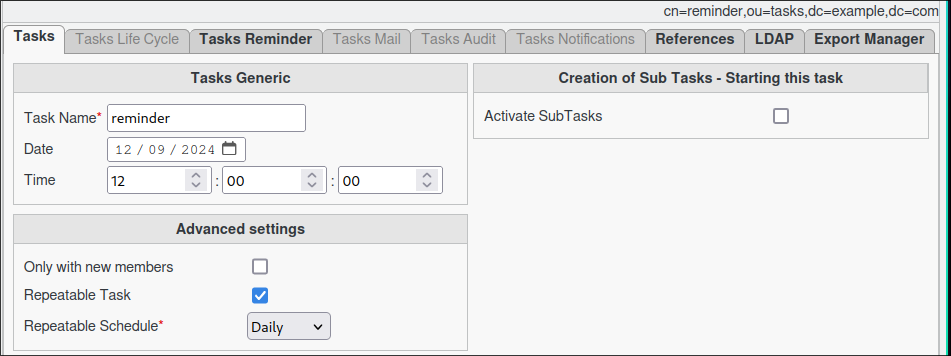
Open the Tasks section in FusionDirectory.
Define the task’s schedule and repetition interval.
Configuring the Reminder Task
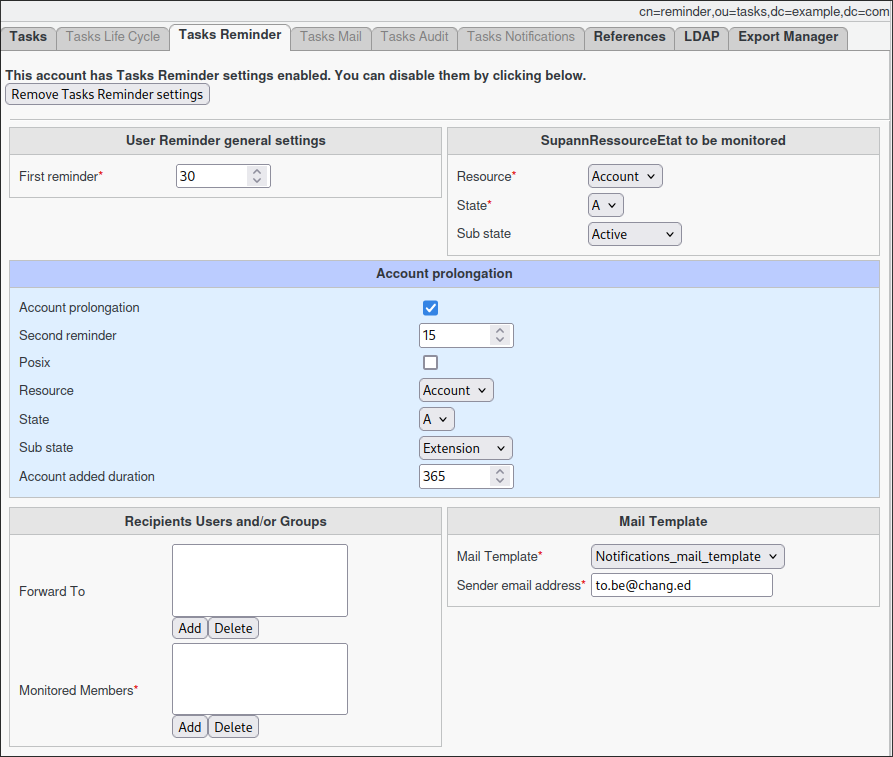
Navigate to the Tasks Reminder tab.
Select the Supann resource to monitor for expiration.
(Optional) Enable the account prolongation feature. - This will provide a link to monitored members, allowing them to extend the specified Supann state.
If Account Prolongation is set
Define the prolongation settings for the specified Supann state.
Tip
You can specify an alternate targeted resource for specific or edge-case scenarios.
Set the additional duration in days.
The specified number of days will be added to the existing end date of the monitored resource.
Assign the members to be monitored.
If prolongation is enabled, they will receive an email with the extension link.
Assign additional recipients within the forward-to to receive a copy of the email.
This can be useful for management or administrative tracking.
Note
You can select either a static group or a dynamic group for greater flexibility.
Task Execution
For your configured task to be executed, you need to configure your FusionDirectory Orchestrator Client.
See Reminder Task Execution for more information.
Summary
Once configured as described, the Reminder Task will:
Run daily (or according to your configured schedule).
Analyze the Supann resource for targeted users.
Send expiry notifications to: - The affected users. - Any recipients listed in the forward-to list.
By ensuring timely reminders, this task helps maintain active user accounts while offering flexibility for organizational needs.