Notifications
The Notification task allows you to defined specific attributes you wish to monitor. If a modification (not a creation), happens to the selected attribute, a notification via email can be send.
Notifications also allows to monitor supann resource. The supan resource targeted is configurable and a notification will be sent when the supann resource is entering that specific state.
Note
It must be used with FusionDirectory Orchestrator.
Task Setup
Creating the Task
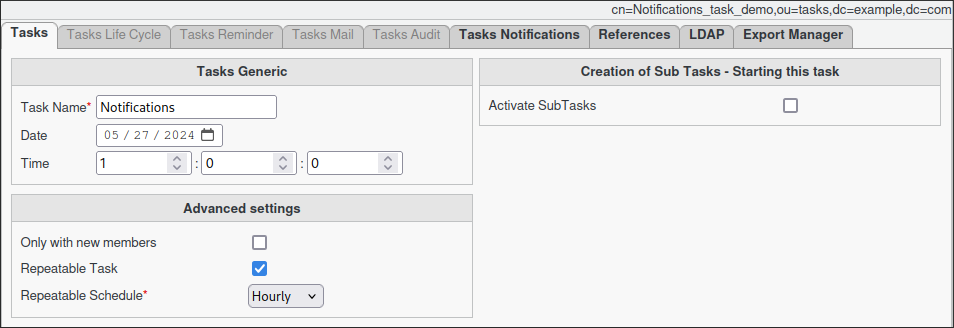
Open the Tasks section in FusionDirectory.
Define the task’s schedule and repetition interval.
Configuring Task Notifications
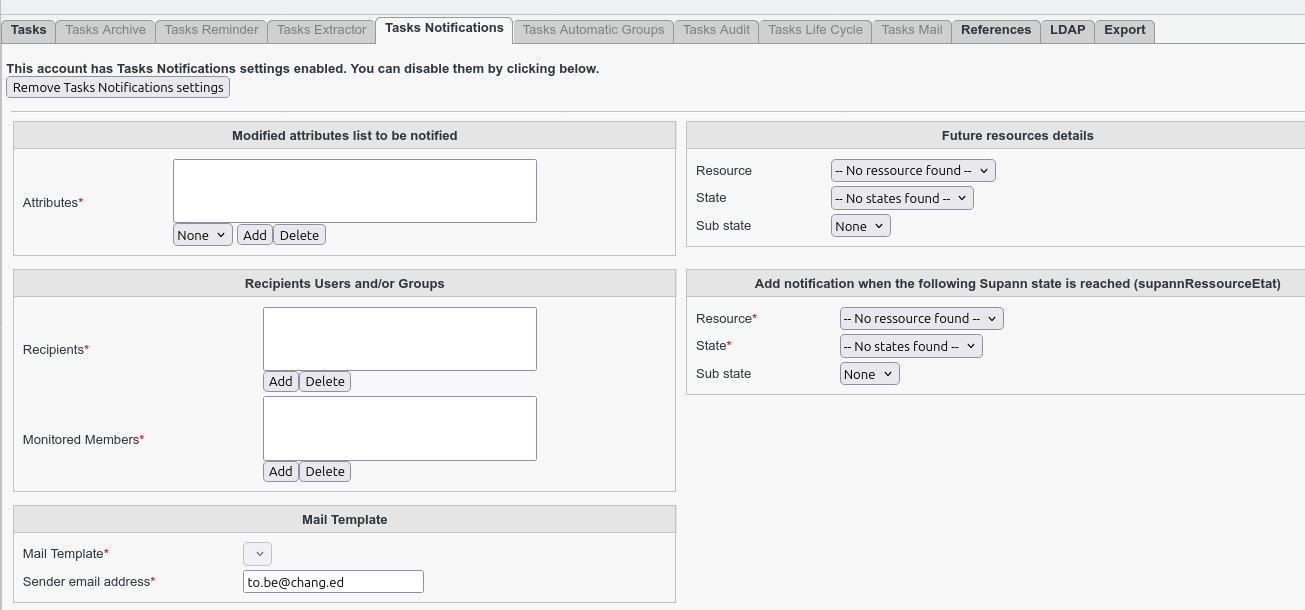
Navigate to the Tasks Notifications tab. Select the attributes to monitor.
Warning
The list of attributes must be configured via the FusionDirectory configuration menu under the Notifications tab before use.
- (Optional) Enable future Supann resource.
Define the next resource, state and substate after notification if you want to use this functionality.
- Assign the relevant monitored members.
These members will be analyzed against the defined attributes in audit logs for any modifications since the last execution of the task.
- Specify the recipients who will receive the notifications.
- (Optional) Enable monitoring of a Supann resource.
This allows notifications to be sent when a member reaches a specific Supann state.
You can choose to monitor both attributes and Supann resources or only one of them.
- Choose the email template to use.
The template must be pre-created.
Specify the sender of the notifications.
Note
You can select either a static group or a dynamic group for greater flexibility.
Note
You cannot use posix groups with this task
Task Execution
For your configured task to be executed, you need to configure your fusiondirectory-orchestrator-client
See Notifications Task Execution. for more information.
Important
Notifications relies on the last executable date. When running the task for the first time, no previous executable date exists. As a protective measure, you must execute the task manually once to create an initial “last execute” timestamp. This timestamp will serve as the basis for triggering notifications in subsequent executions.
Summary
Once configured as described, the Task Notification will:
Analyze the monitored attributes hourly.
Analyze the monitored Supann states hourly.
Send an email notification based on the predefined settings.
Change the resource, state and substate if configured.