Automatic Groups task
The Automatic Groups task dynamically manages group memberships based on specific criteria. It monitors users’ Supann resource states and automatically adds or removes them from designated groups.
Note
It must be used with FusionDirectory Orchestrator.
Task Setup
Creating the Task
Open the Tasks section of FusionDirectory
Define the task’s schedule and repetition interval.
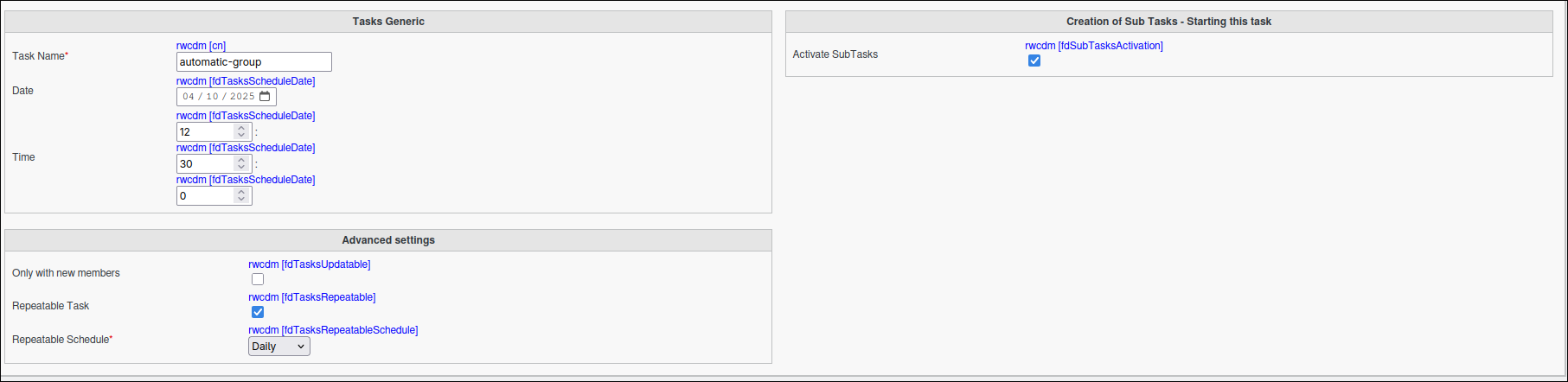
Configuring Automatic Groups Task
Navigate to the Tasks Automatic Groups tab.
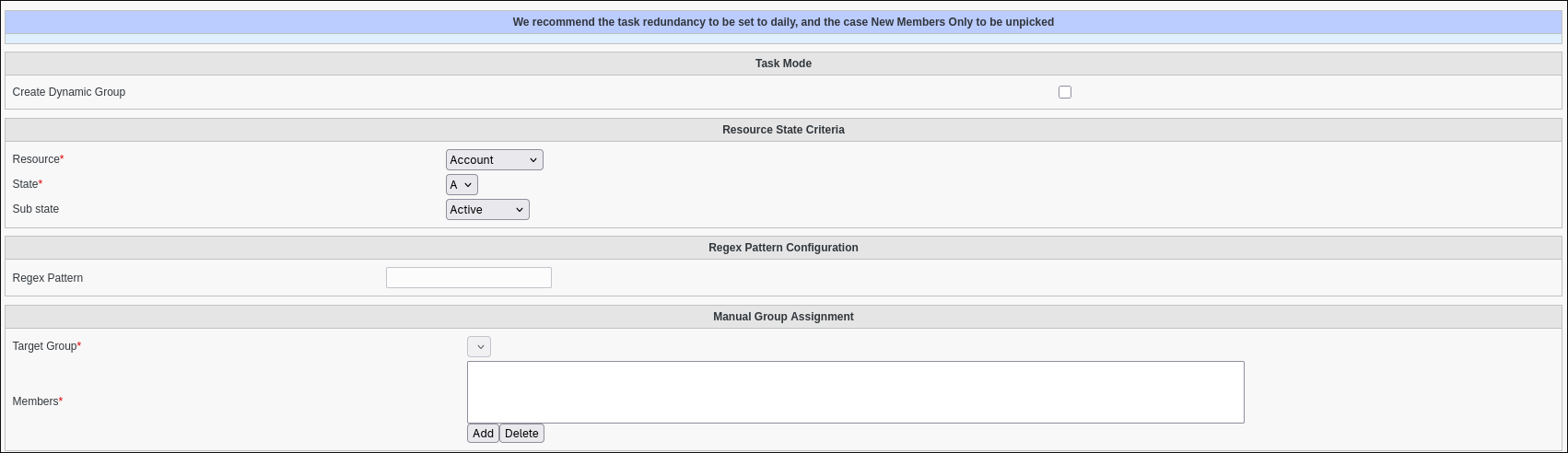
The automatic groups task supports two operating modes:
Standard Group Assignment: Adds or removes users from an existing group based on their Supann resource state criteria
Dynamic Group Creation: Creates a dynamic group with a memberURL filter matching the specified Supann resource state
How It Works
Standard Group Assignment
When the standard automatic groups task executes:
The system identifies all users specified in the task configuration (either directly or through group membership)
For each user, it checks their Supann resource state against the criteria defined in the task
Users who match the criteria are added to the target group
Users who no longer match the criteria are removed from the target group
This ensures that group memberships remain synchronized with the current state of users in your directory.
Optionaly, you can use regex to define more complex matching criteria for the Supann resource.
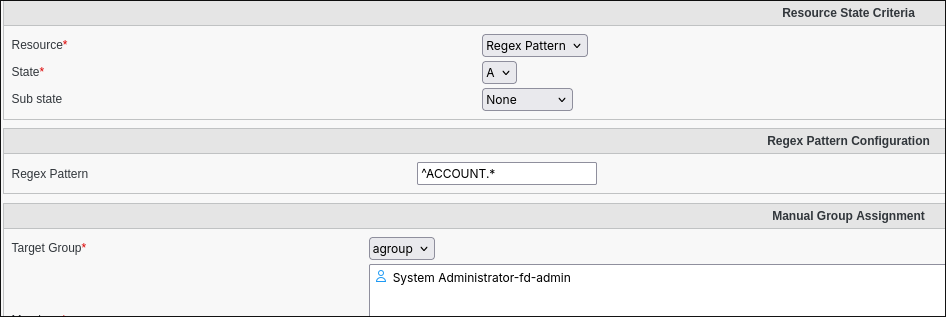
- In the Resource State Criteria section:
Resource: Select
REGEX. This activates the “Regex Pattern Configuration” section.State: Define the state to monitor in conjunction with the regex pattern.
Sub-state (Optional): Define the sub-state.
- In the Regex Pattern Configuration section:
- Regex Pattern: Enter the regular expression to match against the names of the user’s Supann resources (the part within
{}, e.g., “COMPTE”, “MAIL”). A single asterisk
*will be treated as.*(match any character sequence), effectively matching all resource names.Example:
^MAIL.*matches resource names starting with “MAIL”.
- Regex Pattern: Enter the regular expression to match against the names of the user’s Supann resources (the part within
Dynamic Group Creation
When the dynamic group creation task executes:
The system generates a dynamic group name based on the resource, state, and optional substate
It builds an LDAP URL with a filter for the specified Supann resource state criteria
It creates a new dynamic group with the generated name and LDAP URL filter
If a group with the same name already exists, the task succeeds without modifying the existing group
The resulting dynamic group will automatically include all users whose Supann resource state matches the specified criteria, using LDAP’s dynamic membership capabilities.
Note
Regex is also available for the Supann resource (only) criteria in this mode. Creating therefore a custom dynamic group related filter.
Dynamic Group Structure
Dynamic groups created by this task have the following structure:
Name Pattern: dynamic-{resource}-{state}[-{substate}] (always lowercase)
LDAP URL: ldap:///ou=people,{base_dn}??one?(supannRessourceEtat={resource}{state}[:substate])
For example, a dynamic group for resource “COMPTE” with state “A” would be:
Name: dynamic-compte-a
LDAP URL: ldap:///ou=people,dc=example,dc=com??one?(supannRessourceEtat={COMPTE}A)
Task Execution
For your configured task to be executed, you need to configure your fusiondirectory-orchestrator-client
Add the –automatic-groups parameter to your orchestrator client execution:
fusiondirectory-orchestrator-client --automatic-groups   # For standard group assignment mode
fusiondirectory-orchestrator-client --automatic-groups dynamic-group # For dynamic group creation mode
This can be scheduled via cron for regular execution.
Summary
The Automatic Groups Task, when configured as described, will:
Process each user from the selected members list.
Check if they meet the specified Supann resource state criteria.
Add users to the target group if they match the criteria.
Remove users from the target group if they no longer match the criteria.
If using dynamic group creation, it will:
Create a dynamic group with a name based on the resource, state, and optional substate.
Set the group’s memberURL to filter users based on the specified Supann resource state criteria.
Skip creation if a group with the same name already exists.
Note
This ensures group memberships are always in sync with users’ current states, automating what would otherwise be a manual administrative task.