Audit Task
The Audit task helps in managing the backlog of audit logs, freeing up disk space and improving performance by removing logs older than the configured retention period. It can also, instead of removing, transform all audits into syslog format to be grabbed by a syslog server. This task is particularly useful for systems with a large number of audit logs, as it automates the process of log management and ensures that only relevant logs are retained.
Note
It must be used with FusionDirectory Orchestrator.
Task Setup
Creating the Task
Open the Tasks section in FusionDirectory.
Define the task’s schedule and repetition interval.
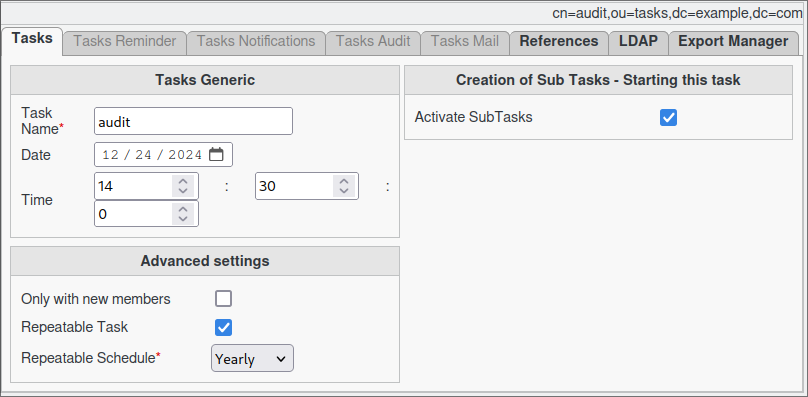
Configuring Audit Task
Go to the Tasks Audit tab.
Configure the desired time retention settings in days.
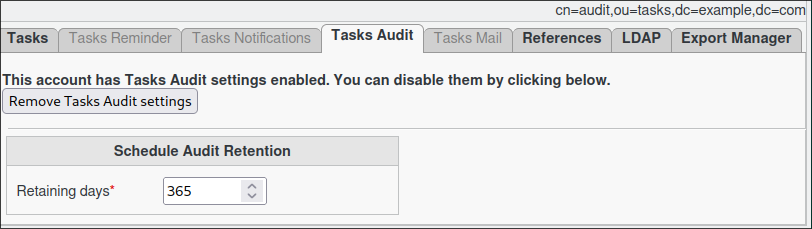
OR enable Syslog Transformation by checking the corresponding box, and then click Save.

Note
You may set a specific prefix for the syslog file, which will be used to name the daily syslog files. If not set, the default prefix will be used.
Task Execution
For your configured task to execute, you need to configure your fusiondirectory-orchestrator-client.
See Audit Task Execution for more information.
Summary
The Audit Task, when configured as described, will:
Automatically remove all audits that have exceeded the configured retention period (if Syslog Transformation is disabled).
Transform audit logs into syslog format (if Syslog Transformation is enabled).
Ensure compliance and efficient data management.
Important Notes
Syslog Transformation and Audit Deletion cannot be enabled simultaneously.
The syslog transformation feature appends audit logs to a daily syslog file located in /var/log/fusiondirectory/.
The retention period is ignored when Syslog Transformation is enabled.