Life Cycle task
The Life Cycle task manages the end of life of your accounts. It uses the end date of a targeted Supann resource and allows for modification, prolongation, or change of state.
Note
It must be used with FusionDirectory Orchestrator.
Task Setup
Creating the Task
Open the Tasks section of FusionDirectory
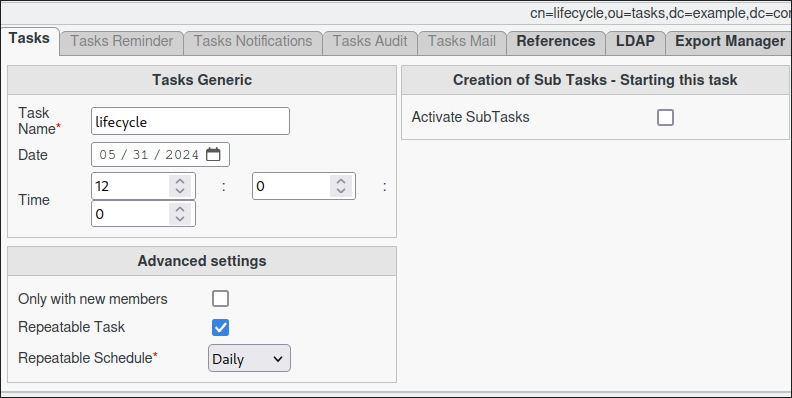
Define the task’s schedule and repetition interval.
Configuring Life Cycle Task
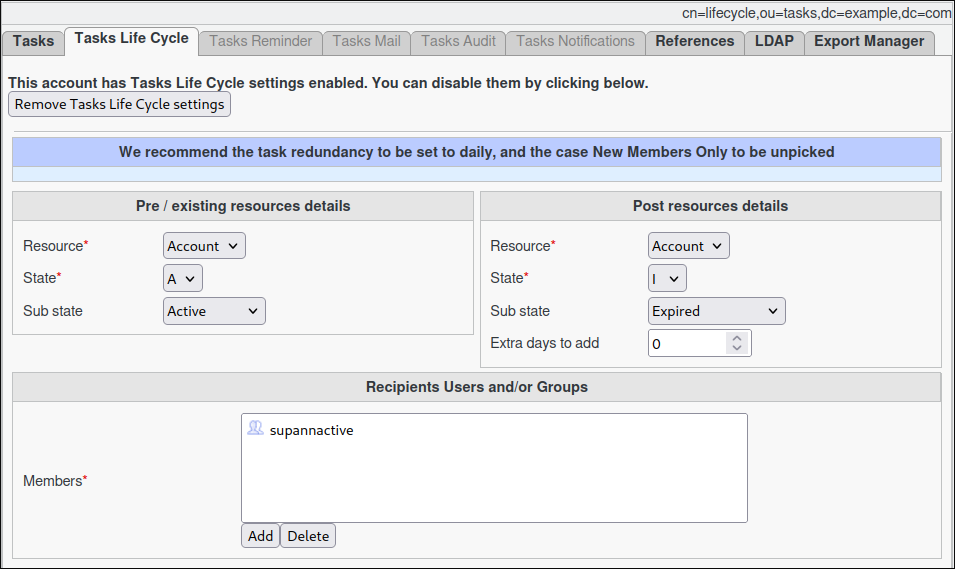
Navigate to the Tasks Life Cycle tab.
Select the resource, state, and (optionally) sub-state to monitor for expiration in the left section.
Choose the resource, state, and (optionally) sub-state to be assigned after the expiration of the previous resource in the right section.
Define the extra days to extend the new resource’s end date. The calculation begins from the last end date of the previous resource.
Assign the relevant members.
Note
You can select either a static group or a dynamic group for greater flexibility.
Task Execution
For your configured task to be executed, you need to configure your fusiondirectory-orchestrator-client
See Life Cycle Task Execution. for more information.
Summary
The Life Cycle Task, when configured as described, will:
Analyze the Supann resource for the targeted user on a daily basis.
Check if the configured state has expired.
If expired, update the Supann resource to the desired configuration.
Note
This ensures automatic resource management and helps maintain up-to-date configurations.